


Top 10 Family Apps for iOS
Join me on a journey through the ever-evolving landscape of iOS applications as I showcase the best of the best, providing insightful reviews, highlighting standout features, and offering expert recommendations. Whether you're a seasoned iOS aficionado or a newcomer to the platform, my curated selection aims to cater to diverse tastes, preferences, and needs, ensuring that you stay informed and inspired in your quest for the ultimate app experience.

FamilyWall: Family Organizer
- Platform: iOS
- Minimum iOS version: 17.0
- Creator: Family & Co
- Price: Free
- User Rating: 4.8 (17.1K Reviews)
Screenshots
App Store Description
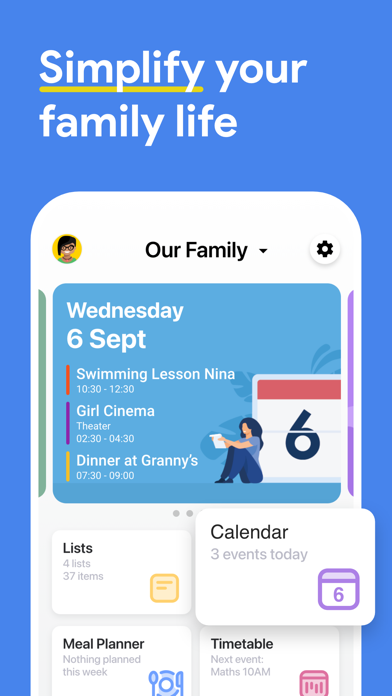
FamilyWall: a game changer for families! Revolutionize the way you organize and connect with your loved ones. From shared calendars to collaborative lists, document sharing to finance tracking, meal planning to secure messaging—it's your all-in-one solution for a seamlessly coordinated family life.
With FamilyWall, you can spend more time doing what you love, and less time organizing it. The whole family can easily access FamilyWall with a smartphone, a tablet or any web browser.
Experience the difference with FamilyWall!
==== FREE FEATURES ====
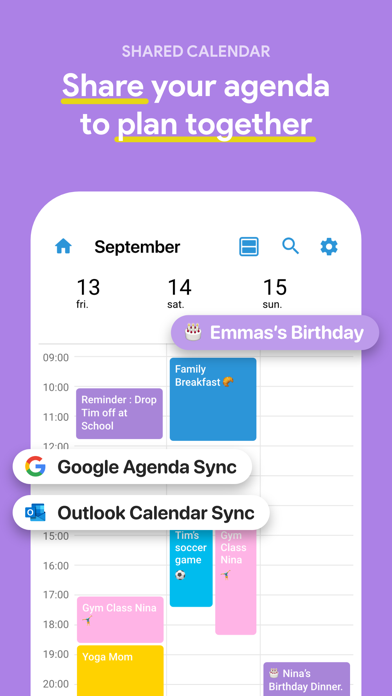
SHARED FAMILY CALENDAR
• Use the color-coded calendar to view an individual's schedule, or the whole family at once
• Set reminders so no one misses soccer practice or an important event
• Import your external calendar with a single touch
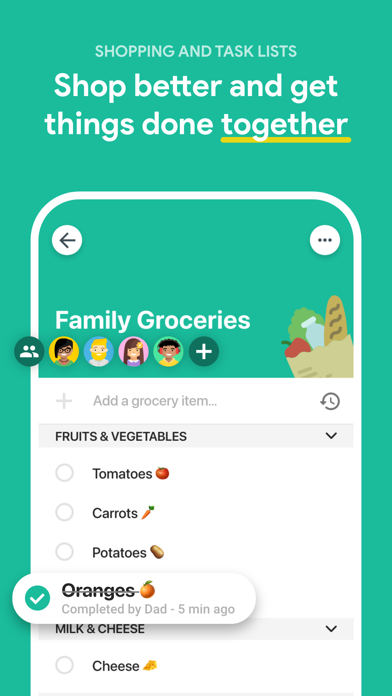
SHOPPING LISTS
• Share grocery and shopping lists with the whole family
• Browse your lists even when you’re offline at the store and quickly check items while you shop
• See items added by other family members. Never forget the almond milk again!
TASK LISTS
• Create a private or shared to-do list, wish list or chore checklist for kids
• Assign to-dos to selected family members
• Create different lists including packing lists, the kids’ camp list, emergency supplies and more
RECIPES
• Store and share your favorite recipes
• Easily import recipes from the Web
FAMILY MESSAGING
Post short messages to one or several family members who will in turn be notified.
FAMILY GALLERY
Share your best moments with your family and friends in a simple and private way.
IMPORTANT CONTACTS
Use the Family Directory to rapidly find useful contacts (e.g. babysitter, grandparents…).
==== FAMILYWALL PREMIUM PLAN ====
In addition to the free features, some exclusive features are available with FamilyWall Premium. You may subscribe to the Premium Plan at any time and enjoy the following benefits:
BUDGET
• Track your Family expenses
• Set spending limits per categories
MEAL PLANNER
• Plan your meals ahead for the week
• Import your ingredients in your shopping list in one click
FAMILY DOCUMENTS
• Store and share important Family documents
• Create private or shared folders to better manage your documents
SCHEDULES
• Manage your different schedules (recurring or not)
• Easily import schedules from universities or school via Url
ADVANCED CALENDAR FEATURES
• Google & Outook Calendar Sync
• Subscribe to any public or shared calendar via its URL
LOCATOR
• Locate family members and receive notifications for arrivals and departures
AND MORE…
• Benefit from 25 GB Storage
• Enjoy audio and video messaging
After the Free 30 day trial, the Premium offer is charged on a subscription basis for 7.99 USD / month or 44.99 USD / Year (for the US). For the rest of the world, please refer to the price automatically prompted to you by the application. Payment will be charged to your iTunes Account at confirmation of purchase. Subscription automatically renews unless auto-renew is turned off at least 24-hours before the end of the current period. Subscriptions may be managed by you and auto-renewal may be turned off by going to your user's Account Settings after purchase. Any unused portion of a free trial period, if offered, will be forfeited when the user purchases a subscription to that publication, where applicable. The Premium Plan features are applied to the first 5 circles created.
TERMS OF USE: https://www.familywall.com/terms.html
PRIVACY POLICY: https://www.familywall.com/privacy.html
Disclaimer: Continued usage of location services while the app is in the background can excessively drain the battery.
But not to worry, we’ve spent so many years developing our location technology in order to always keep battery usage to a minimum, even while you move!
Enjoy!
The FamilyWall Team

Life360: Stay Connected & Safe
- Platform: iOS
- Minimum iOS version: 17.2
- Creator: Life360
- Price: Free
- User Rating: 4.8 (2.6M Reviews)
Screenshots

App Store Description
Whether at home, online, or on the move, our comprehensive family safety features bring peace of mind to your loved ones AND help safeguard your personal belongings. Experience location safety features that surpass ordinary GPS tracking apps. More than just a GPS location tracker, with Life360, finding friends and family has never been easier.
In addition to focusing on safety, Life360 allows you to effortlessly keep tabs on your pets, keys, wallet, phone, and other essentials using Tile Bluetooth trackers and the NEW Life360 Pet GPS. These trackers integrate with your Life360 map, ensuring you can easily locate everything and everyone that matters most from a single, convenient platform.
Life360 memberships include essential safety features like:
- SOS Alerts: Send silent alerts with your precise location to friends, family members, emergency contacts, and responders.
- 24/7 Emergency Dispatch: We're here for your loved ones, always ready to respond, even when you can't make the call.
- Identity Theft Protection: Safeguard sensitive digital information for each family member, backed by a white-glove restoration service.
- Roadside Assistance: Free towing, jumpstarts, tire changes, lockout assistance, refueling and more.
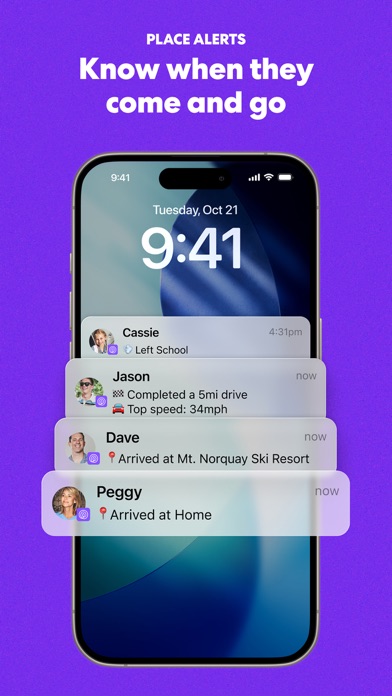
Download the free app now to access Advanced Location Sharing, Location History, Crash Detection, and Place Alerts. Keep tabs on your family members as they come and go from key locations like home, school and work.
Take your safety to the next level by upgrading to one of our premium Life360 memberships. Choose the plan that suits your friend's and family's unique needs and enjoy a 7-day free trial.
Life360 Silver - Simplify your safety with features such as:
- 2 Places with unlimited Alerts
- 2 days of Location History
- Crash Detection
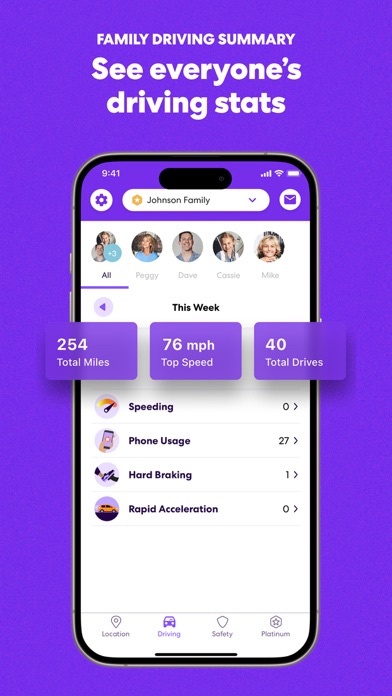
- Family Driving Summary
- Data Breach Alerts
- SOS Help Alerts During Emergencies
Life360 Gold* - Keep your family secure on the go with all the features of Life360 Silver, plus:
- 30 days of Location History
- Unlimited Place Alerts
- Individual Driver Reports
- Crash Detection with emergency dispatch and live agent support
- 24/7 Roadside Assistance
- $250 in Stolen Phone Protection
- ID Theft Protection and Data Breach Alerts
- $25,000 in Stolen Fund Reimbursement
Life360 Platinum* - Prepare for anything, anywhere, with all the features of Life360 Gold, plus:
- $1 million in Stolen Fund Reimbursement
- 50 miles of Free towing
- $500 in Stolen Phone Protection
- Travel Support with Disaster Assistance
- Medical Support
https://www.life360.com/privacy_policy/
https://www.life360.com/terms_of_use/
Explanation for App Permissions [Optional Permissions]
• Camera: App accesses user’s camera to allow users to take photos or videos on the app.
• Location: App accesses location information to allow users to share location information to other Circle members.
• Microphone: App accesses microphone to allow users to record and share voice memos.
• Music and audio: App accesses music and audio to play music and audio.
• Nearby devices: App accesses nearby devices to find, connect to and determine the relative position of nearby devices by using Bluetooth.
• Notifications: App accesses notification to send notification to users.
• Phone: App accesses user’s phone to allow users to make phone calls on the app
• Photos and videos: App accesses photos and videos to allow users to view photos and videos on the app.
• Physical activity: App accesses physical activities to calculate and detect driving events, such as driving speed, use of breaks, and accident detection.
You may still use the app even if you withhold optional permissions. However, app features requiring permission may not be available in such cases.

Cozi Family Organizer
- Platform: iOS
- Minimum iOS version: 17.0
- Creator: Cozi
- Price: Free
- User Rating: 4.8 (384.4K Reviews)
Screenshots
App Store Description
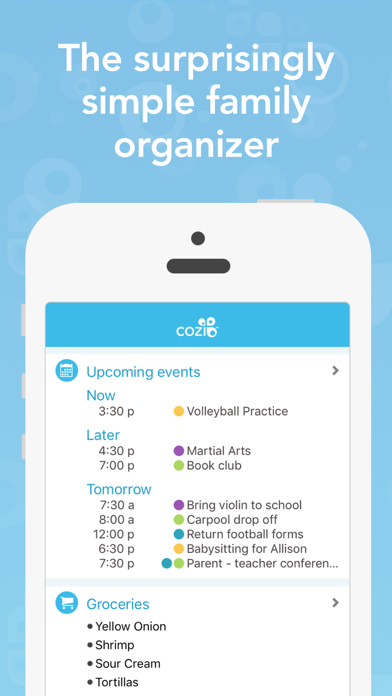
Cozi Family Organizer is the surprisingly simple way to manage everyday family life. With a shared calendar, reminders, grocery list and more, Cozi is a 3-time Mom’s Choice Award Winner and The TODAY Show “must-have app” for a better life.
Cozi is free, easy to use, and available from any mobile device or computer.
FAMILY CALENDAR
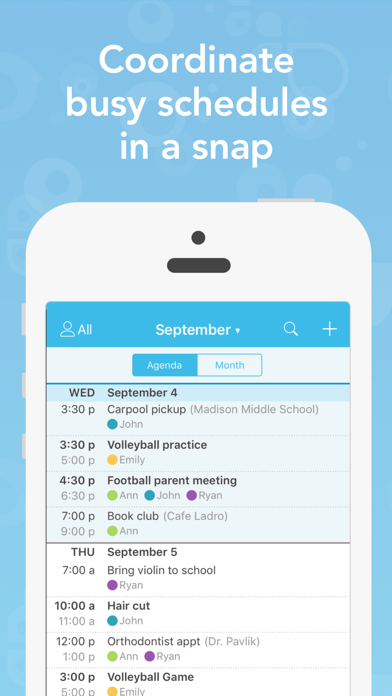
• Keep track of everyone’s schedules in one place with a simple color-coded calendar
• Set reminders for yourself or others in the family so no one misses practice or an important event
• Send automated daily or weekly agenda emails to any family member
• Subscribe to other calendars you use like your work calendar, school calendars, personal calendars, and team schedules.
SHOPPING LISTS & TO DO LISTS
• Everyone in the family will always know what you need at the grocery store
• See items added by other family members in real time, and never forget the one thing you really need to make dinner
• Create to do lists for anything - a shared to do list for the whole family, chore checklists for the kids, a vacation packing checklist.
RECIPE BOX
• Organize all your recipes in one place that's accessible anytime, anywhere - at home or at the store
• Add ingredients to your shopping list quickly and schedule meals onto your calendar
• Cook from your phone with helpful features like the no-dim button that keeps your screen on while you're cooking
MORE ABOUT COZI
• Your Cozi calendar, shopping lists, to do items, and recipe box are accessible from any mobile device or computer
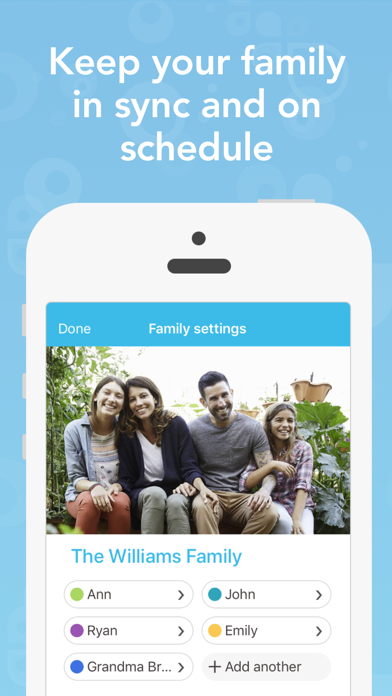
• No matter where or how your family signs in to Cozi, everyone will be looking at the same information
• The whole family shares one account that everyone can access using their own email address (as specified in Settings) and the shared family password
RAVE REVIEWS ABOUT COZI
• "Cozi is, in short, ridiculously handy. My only regret is that I waited this long to start using it." –PC World
• "Cozi just works. It looks clean, organized and uncluttered, regardless of hectic schedules." –The Wall Street Journal
• "This thing is indispensable for busy families" –CNET
• "Cozi is a FlyLady-approved application." –The FlyLady
COZI GOLD
All the features listed above are free. Cozi also offers an optional ad-free premium subscription called Cozi Gold which gives you additional features, including access to add, edit and view events more than 30 days ahead, more reminders, mobile month view, change notifications, and birthday tracker.
Your subscription is charged to your credit card through your Apple account. Your subscription automatically renews each year within 24 hours prior to the end of the current period. You may cancel your subscription at any time by turning off auto-renew in your Apple account at least 24 hours before the end of the current period. You can manage your subscription in the App Store app.
Cozi privacy policy: www.cozi.com/privacy-policy/
Cozi terms of use: www.cozi.com/terms-of-use/

Google Family Link
- Platform: iOS
- Minimum iOS version: 17.0
- Creator: Google
- Price: Free
- User Rating: 4.7 (270.7K Reviews)
Screenshots
App Store Description
Google Family Link is a parental controls app that helps you keep your family safer online. Every family’s relationship with technology is unique, so we built tools for you to choose the right balance for your family, and help them create healthy digital habits. You can use the app to see how your child is spending time on their device, see their device location, manage privacy settings, and more.
With Family Link, you can:
Establish digital ground rules
• Set screen time limits — Find the screen time that works best for your child. Family Link lets you set daily time limits, with school time and downtime schedules for their devices, so you can help your child find a healthy balance.
• Manage your child’s apps — Give your child the flexibility they need when it comes to app usage. Set individual app time limits, and unlimited time for educational or regularly used apps. You can block apps, too.
Manage content filters and security & privacy
• Manage what they see online — Set up parental controls on Google services like Chrome, Play, YouTube, and Search. Family Link allows you to block inappropriate sites, require approval for new apps, manage permissions for apps and websites, and more.
• Secure their account — Family Link gives you access to manage your child’s account and data settings. As a parent, you can help change or reset your child’s password if they forget it, edit their personal information or even delete their account if you feel necessary.*
*Children over the applicable age can manage their own account.
Stay connected on the go
• See where they are — It’s helpful to be able to find your family when they’re on the go. With Family Link, you can locate your children on one map, as long as they’re carrying their device.
• Get notifications and alerts — Family Link delivers critical notifications including when your child arrives or leaves a certain location. You can also ring devices and view the device’s remaining battery life.
Important Information
• Family Link’s tools vary depending on your child’s device. See a list of compatible devices at https://families.google/familylink/device-compatibility/
• While Family Link helps you manage your child’s purchases and downloads from Google Play, they will not need approval to install app updates (including updates that expand permissions), apps you have previously approved, or apps that have been shared in Family Library. In addition, purchase approvals will apply only when your child makes a purchase through Google Play’s billing system and will not apply to purchases made through alternate billing systems. Parents should regularly review their child’s installed apps and app permissions in Family Link.
• You should carefully review the apps on your child’s supervised device and disable those you don’t want them to use. Note that you may not be able to disable some pre-installed apps such as Play, Google, etc.
• To see the location of your child or teen’s device, the device must be powered on, recently active, and connected to the internet through data or wifi.
• Family Link parental controls are only available for supervised Google accounts. With supervised Google Accounts, children get access to Google products like Search, Chrome, and Gmail, and parents can set up basic digital ground rules to supervise them.
• While Family Link provides tools to manage your child’s online experience and keep them safer online, it does not make the internet safe. Family Link can not determine the content on the internet, but it can give parents the opportunity to make decisions about how their child spends time on their device, and determine what path to online safety looks best for your family.

Shared Family Calendar: FamCal
- Platform: iOS
- Minimum iOS version: 15.0
- Creator: Beesoft Apps
- Price: Free
- User Rating: 4.9 (26.5K Reviews)
Screenshots
App Store Description
Keep your family organized and connected with our shared calendar app.
Easily manage schedules, tasks, and notes in one place, so everyone stays on track and nothing important gets missed.
FEATURES:
FAMILY MEMBERS
- Adult members with email addresses
- Child members without email addresses
- Color code events with members' colours
FAMILY CALENDAR
- Share events with whole family
- Add or edit event that everyone in the family group can see
- Set local notifications or notify someone from cloud server
- Both calendar and agenda view
- Color code events with members' colours
SHARE LISTS & ASSIGN TASKS
- Share grocery list, shopping list or even work schedule & more
- Create task lists and to-dos
FAMILY MEMOS
- Share notes or jot down a moment
- Unlimited notes to share with family members
- Leave comments for each memo
SHARED RECIPES
- Organize all your recipes in one place
- Add ingredients to your shopping list just by one tap
- Schedule meals onto your calendar quickly and easily
- Add new recipes manually or import from URL
- Provided no-dim button that keeps your screen on while you're cooking from your phone
SHARED TRIP EXPENSES
- Organize all your trips in one place
- Record every expense during a trip
- Multiple charts to analyze all expenses in a trip
- Export all expenses of any trip in PDF or CSV format
STAY CONNECTED & IN SYNC
Organize your calendar, projects and notes at everywhere, access with any devices. The whole family group shares one account, so login with your own email address and a shared password.
FamCal is great for family, group or anyone who needs to stay organized together. You can schedule together, achieve projects together. There is no limit in events, tasks and notes, you can create as many as you need.
All the functions listed above are basic, we also offer an ad-free version with many additional features(available as a subscription)
- Text month view
- Shared contacts
- Birthday Tracker
- Anniversary Tracker
- Export Schedule
Subscription Information:
- Weekly and annual subscriptions are available.
- Payment will be charged to iTunes Account at confirmation of purchase
- Subscription automatically renews unless auto-renew is turned off at least 24-hours before the end of the current period
- Account will be charged for renewal within 24-hours prior to the end of the current period, and identify the cost of the renewal
- Subscriptions may be managed by the user and auto-renewal may be turned off by going to the user's Account Settings after purchase
The content of the screenshots, preview videos, and audio are provided by the following platforms:
- Shutterstock: Used with permission from Shutterstock.com (where applicable)
- Epidemic Sound: Touch by Otherguys / provided by Epidemic Sound
- Freepik: Designed by Freepik
- iStock: Standard license obtained from iStock
Terms of Use: http://www.appxy.com/termsofuse/
Privacy Policy: http://www.appxy.com/famcalprivacy/
If you have any problems or suggestions please send an email to famcal@support.beesoft.io, you’ll get a response as soon as possible.

Homey - Chores and Allowance
- Platform: iOS
- Minimum iOS version: 13.0
- Creator: Homeylabs Inc
- Price: Free
- User Rating: 4.1 (2.8K Reviews)
Screenshots
App Store Description
The perfect app to teach your kids about money through completing chores and working towards goals.
Don’t listen to us, listen to those that fell in love with it.
“I love that the Homey not only encourages kids to develop a strong work ethic, but it teaches kids how money is earned, encourages long-term goal setting, instills real life financial skills, and connects the whole family with a fun approach to paid chores.” Crystal, MoneySavingMom
“Homey is a great organizational tool for families!” Best Apps for Kids
“Homey helps remind my children what jobs they haven’t done yet, so I don’t need to. It even inspires them to work a little harder to earn allowance. Better yet, they are learning to save up that allowance for a bigger reward.” Gloria, JugglingMother
“A picture says a thousand words. And with Homey, those words are “this is the chore you’re supposed to be doing right now.” Snap a photo of your kid’s unmade bed and send it to them with a deadline, and then they can send a photo back once it’s taken care of.” Fatherly
Features:
- set daily, weekly or monthly recurring or one time chores for the whole family
- set chores that are responsibilities and you won't pay for, and jobs to teach kids how to earn money or rewards
- manage allowance and extra money rewards for each child
- transfer allowance to a bank account (US only), or mark it as payed out in cash
- track IOU
- add or remove funds from wallet
- set saving jars with financial goals
- kids learn to manage their funds
- Homey syncs across all devices in the household
SHOW KIDS HOW MONEY IS EARNED
With Homey you can pay kids commissions based on chores they do around the house like taking out the trash, cleaning their room, or mowing the grass. And you can also set responsibilities that are required to teach kids that everyone needs to contribute to the household.
SUPPORT LONG-TERM GOALS AND SAVING
Teach kids delayed gratification and financial responsibility by providing them with incentives that differ in value. With Homey kids learn they need to work longer or harder to earn more.
TEACH REAL LIFE FINANCIAL SKILLS
Homey enables you to transfer allowance and money kids earn directly to their savings or checking account or tracks the money as IOU and pay it out in cash. This way you can teach your child how banking works, they can accumulate interests on their savings and you can be sure that their money will stay safe.
By subscribing to Homey Monthly or Homey Yearly you'll get access to other great features like:
Unlimited family members.
Connecting your bank account and safely transferring allowance and chore money directly to your child's savings account.
Multiple saving jars for each child.
Adding or deducting money from the wallet.
Customizable permissions.
• You can subscribe on a month-to-month or yearly basis.
• The payment will be charged to your iTunes Account when you confirm the purchase.
• The subscription automatically renews for the same price and duration period as the original monthly/yearly plan unless canceled at least 24-hours before the end of the current period.
• Free trial automatically converts to a paid subscription unless canceled at least 24-hours before the end of the trial period. From that point onwards, subscription automatically renews unless canceled at least 24-hours before the end of the current period.
• You can cancel the subscription or the free trial anytime via the subscription setting through your iTunes account (go to your device settings and tap iTunes & App Store > Apple ID > View Apple ID > enter the password > Subscriptions > Assembly > Cancel Subscription button at the bottom). Do it at least 24 hours before the end of the free trial or subscription period to avoid being charged. Learn more: http://support.apple.com/kb/ht4098
• Any unused portion of a free trial period will be forfeited when the user purchases a subscription.
Terms and Conditions: http://www.homeyapp.net/homey-terms-conditions/

FamilySearch Tree
- Platform: iOS
- Minimum iOS version: 17.0
- Creator: FamilySearch International
- Price: Free
- User Rating: 4.8 (480.1K Reviews)
Screenshots


App Store Description
Curious about your family history? Add branches to your family tree with FamilySearch Tree, the world’s largest online family tree. FamilySearch Tree makes it easy and convenient to discover and document your own branches of the world’s family tree while preserving family memories, such as photos, written stories, and audio recordings.
Harness the power of a worldwide, crowd-sourced pedigree to discover your family story. As you add information, FamilySearch will start searching for your family members while looking at historical records like birth and death certificates. Share information that others might not know, and add sources to confirm correct information. Update information and records easily so that everyone has accurate information.
Browse your family tree branches, and see portraits of relatives you’ve never seen before. Discover facts, documents, stories, photos, and recordings about your ancestors. Easily add new life details, photos, stories, and audio recordings for your relatives.
Find and share meaningful, heart-turning family stories that will make an impact on your life and the lives of your loved ones.
Genealogy at Your Fingertips
Family history has never been easier to track and build.
Build your family tree by finding or adding family members directly through the app.
Once you add a deceased relative to the family tree, FamilySearch will try to connect you to any information it has about that person in its database.
Discover new family members and descendants in the community tree.
Explore your heritage in maps that show where the key events of your ancestors’ lives took place.
Ancestors, Relatives, and Family
Find your ancestors in the billions of records on FamilySearch.org to learn more details of your family story.
Discover facts, documents, stories, photos, and recordings about your ancestors.
Easily add new life details, photos, stories, and audio recordings for your relatives.
See which ancestors FamilySearch has already found in historical records, and get ideas for what to do next.
Discovering your own family history potentially helps others in their search.
Explore your heritage in maps that show where the key events of your ancestors’ lives took place.
Collaborate with Others
Connect with other family members, and share information that others might not know.
View, add, and edit information about your ancestors.
Enhance your tree by adding photos, stories, and documents.
Add sources to confirm correct information.
Communicate and collaborate with other FamilySearch users from within the app with in-app messaging.
Connect with family near and far. You may find a relative who has visited the same graves, asked the same questions about—and even learned to love or admire—the same ancestors.
Watch your family tree grow. Discover family, learn your family history, and help map the family tree for mankind with FamilySearch Tree.
NOTE: Content you provide for deceased individuals will be publicly available. See our privacy policy for more details.

Focus on the Family App
- Platform: iOS
- Minimum iOS version: 15.1
- Creator: Focus on the Family
- Price: Free
- User Rating: 4.2 (252 Reviews)
Screenshots



App Store Description
Take Focus wherever life takes you. The seasons of your life are always moving forward —singlehood, marriage, parenting, aging well. Through it all, Focus on the Family is alongside you with encouragement and resources, all from a Christian perspective you can trust. To help your marriage. To help you in raising your kids. To help your family thrive in Christ.
Mobile app version: 6.20.0

Skylight App
- Platform: iOS
- Minimum iOS version: 16.6
- Creator: Skylight Frame
- Price: Free
- User Rating: 4.8 (43.9K Reviews)
Screenshots
App Store Description
Skylight is the operating system for your family, bringing everyone’s calendars, lists, routines, and memories into one place. The Skylight App can be used to activate and manage your Skylight Calendar and Skylight Frame.
Skylight Calendar
- Sync unlimited calendars or create events directly
- Set recurring chores & routines to keep everyone aligned
- Share grocery and to-do lists, plus more!
- Earn stars and unlock Rewards for completed tasks [PLUS]
- Build your family recipe book & meal plans [PLUS]
- Upload photos & videos to use as screensavers [PLUS]
- Auto-import events, PDFs, recipes & more [PLUS]
Skylight Frame
- Easy setup: Connect to WiFi and go
- Add photos anytime, anywhere via app or email
- Create unlimited albums with captions
- Upload videos and customize your display [PLUS]
You can find our Terms of Service here: https://myskylight.com/tos/


Comments
Post your comments